



HubSpot vs. WordPress: The choice of content management system depends on your needs. We'll show you the differences between the two systems.
Last updated: June 17, 2024
HubSpot vs. WordPress—which content management system (CMS) best suits your needs? Which one coversall the features you want for your website relaunch ? WordPress is a pure CMS with a wide variety of plugins; HubSpot also offers integration with a customer relationship management system (CRM). We’ll help you make the right choice by comparing the features of both content management systems.
General Information
WordPress
WordPress, which started as blogging software, is an open-source project used as a CMS by nearly 18 million websites worldwide. It’s built on a database that now offers more than 56,000 free and paid plugins for every conceivable use case. This covers forms, caching, and SEO tools. Translations, backup creation, and much more are also available through these extensions. The standardized programming language makes it easy for developers to create their own plugins and make them available in the database. As a result, WordPress is virtually limitless in its expandability as a CMS. With the right plugins and technical know-how, all features can be customized to your needs.
As a WordPress user, you also have access to a database of free and paid themes for designing your website. These, too, can be customized to suit your preferences. Content in WordPress is edited using its own editor. The basic functions of the Gutenberg Editor or WordPress Editor—which are very similar to those of a standard word processor (such as Microsoft Word or OpenOffice Writer)—are sufficient.
HubSpot
HubSpot is rooted in the Inbound Marketing approach and, as an all-in-one platform , covers all key functions of the marketing, sales, and service processesthrough its modules . This now also includes HubSpot’s own CMS, which can be licensed independently of the other modules. This means that for anyone planning a website relaunch , the tool is a viable alternative—without having to immediately migrate your entire marketing process to a new platform. The advantage: HubSpot also provides you with a free HubSpot CRM . This makes it very easy to personalize websites—features that aren’t so easy to implement with WordPress. In addition to custom designs, HubSpot also lets you create websites based on page templates, some of which can be purchased in the Marketplace. Individual modules are also available.
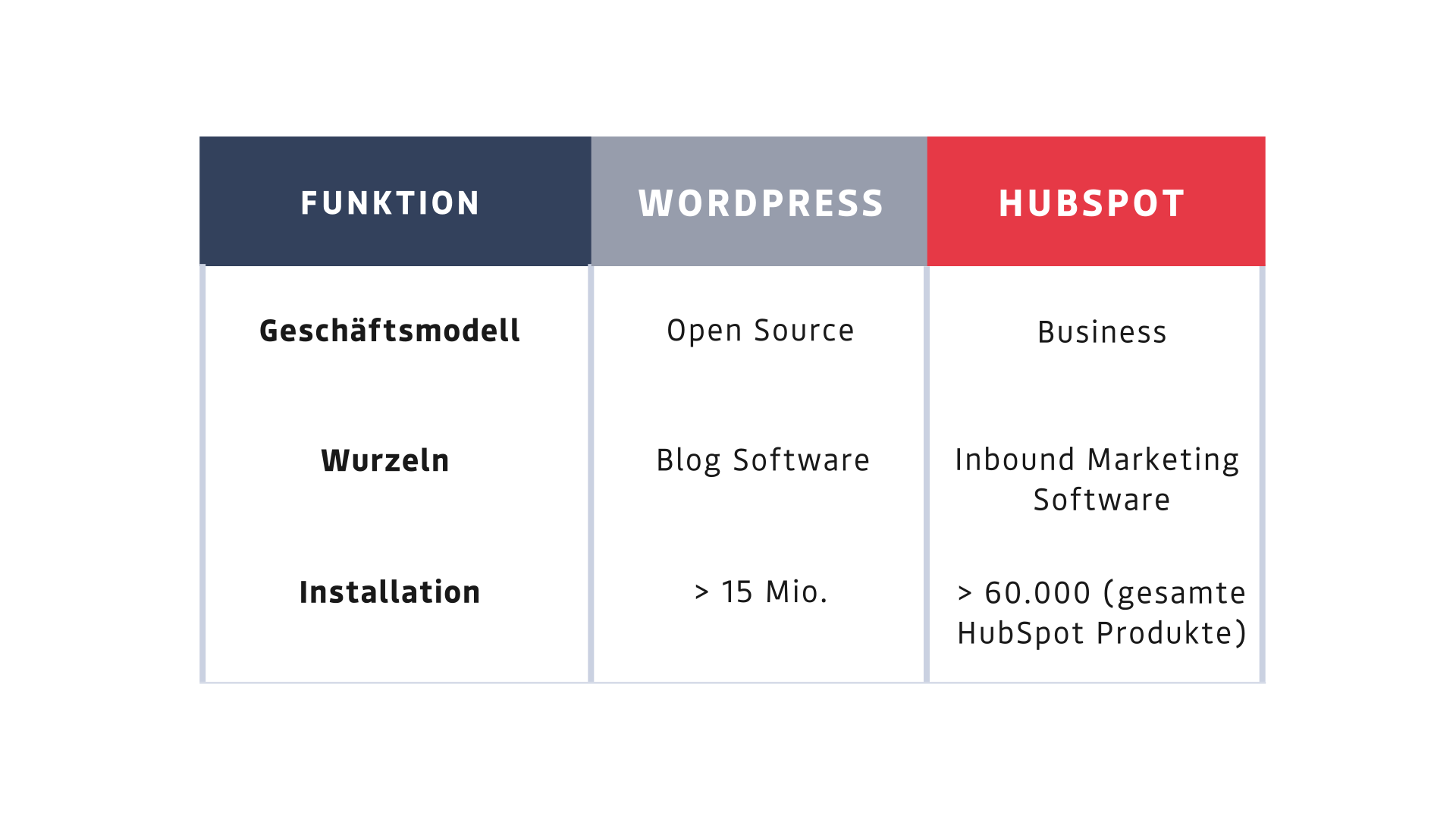

HubSpot vs. WordPress: The Most Important Features
Blogging & Websites
WordPress, originally a pure blogging tool, has evolved into a comprehensive CMS. When it comes to designing your website, WordPress offers a wide variety of free themes. However, depending on the theme, it’s advisable to ask a development team for help when editing the layout.
Plugins also offer you nearly limitless possibilities for implementing all your ideas on WordPress. But be aware: Plugins usually come at a cost. For example, to optimize your content for search engines, you’ll need a suitable plugin, which typically costs extra.
When it comes to websites, WordPress doesn’t distinguish between different types of web pages. If you want to create a landing page, for example, you set it up as a simple page and add a form using the appropriate plugin. (Note: This usually involves additional costs!)
On top of that, WordPress is very technical, and getting started with it can be overwhelming. The menu structure and management options can be confusing at first, and it may be helpful to reach out to a digital agency that can assist you with the setup.
HubSpot, on the other hand, is geared more toward marketing professionals and offers a simpler interface for editing your blog posts. It features a WYSIWYG editor as well as a text editor that’s intuitive to use and essentially has the same functions you’re familiar with from MS Word. Here, you can draft, schedule, and publish blog posts. In addition, HubSpot has built-in tools for search engine optimization and AMP support for fast-loading web pages in browsers and on mobile devices. No plugins needed!
HubSpot also offers a wide range of themes and templates for your websites—though the database isn’t quite as extensive as WordPress’s yet.
-1.svg)
SEO & Analytics
Most content management systems, including WordPress, are designed to create and publish websites. Search engine optimization and analytics features are only available through plugins or additional software. The best-known is the YOAST SEO plugin, which is free in its basic version. Since 2019, there’s even been an exclusive plugin from Google—the so-called Google Site Kit—that lets you conveniently use Google’s tools and services on your WordPress website (Source: https://wordpress.com/de/google/).
Unfortunately, the same applies here: (almost) every plugin adds extra costs to the final bill.
For website analysis, many people therefore prefer to use external tools. But you should be careful here as well, because external plugins usually mean not only more administrative work and additional costs for you, but also an increased security risk for your data privacy.
HubSpot offers you far more built-in features. In addition to native on-page optimization, you can organize content into topic clusters ( the“pillar content” concept) to optimize internal linking, for example. You can also integrate Google Search Console so you can access this information directly within HubSpot.
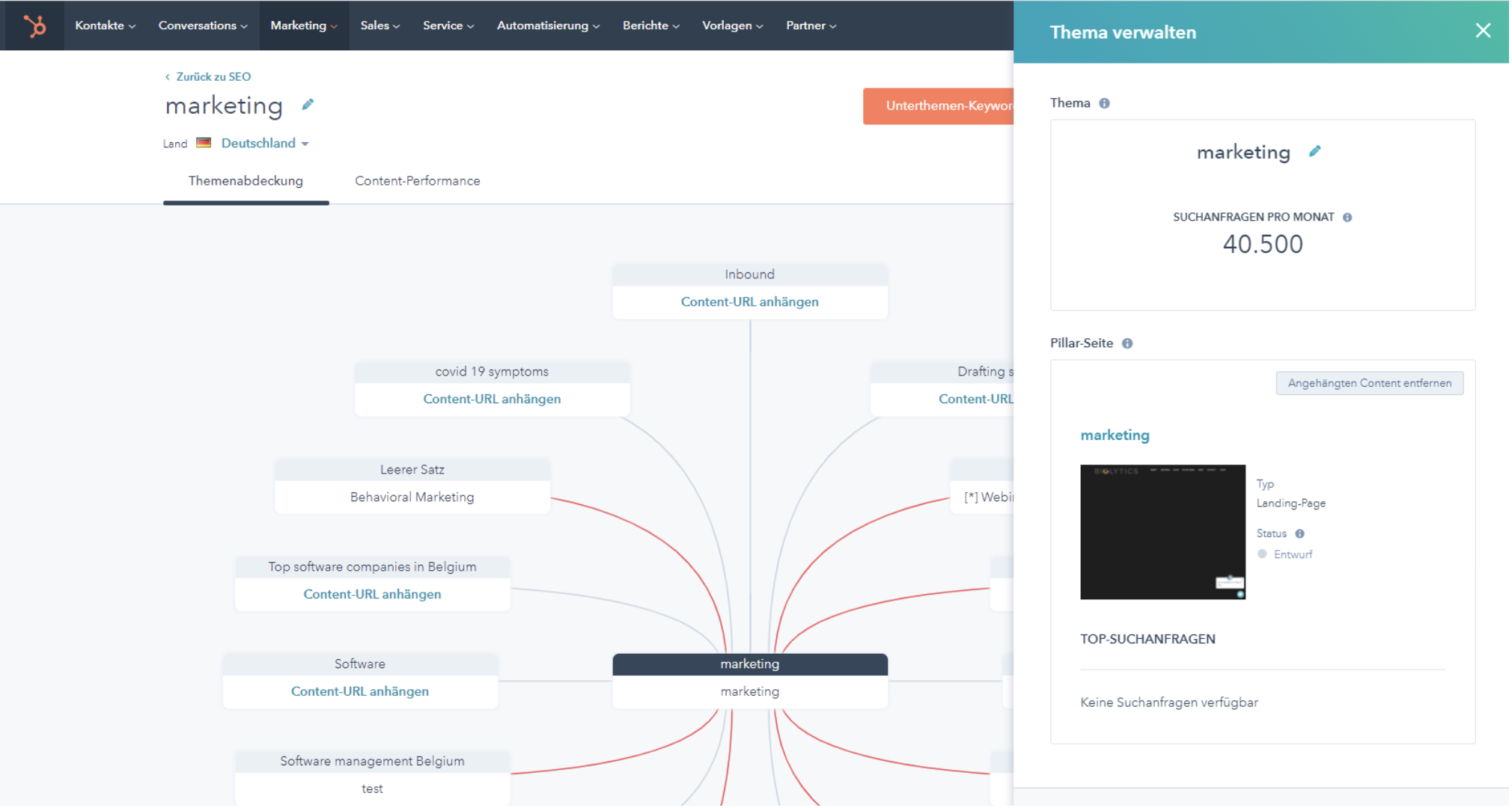
Source: https://www.hubspot.de/comparisons/wordpress-vs-hubspot
In addition, HubSpot provides all key website analytics data directly in clear, easy-to-read charts. In addition to website visitors, you can also track conversions directly—all without additional tools or plugins and without hidden costs.
.svg)
Lead Generation & Marketing Automation
In this category, the gap begins to widen a bit more… Because when it comes to lead generation, HubSpot is simply in its element. So if you want to actively generate leads and value streamlined processes that don’t require a major IT effort, HubSpot is the right choice for you.
WordPress is primarily about creating and publishing websites. Of course, other systems can be integrated with it—for example, to embed forms, add email marketing features, or connect to CRM systems. However, lead generation quickly turns into an IT project due to the numerous interfaces through which individual data points must be transferred.
HubSpot, on the other hand, offers a directly integrated CRM system. This means that leads collected through the website are routed directly there, and all information converges in one place. This integration allows you to personalize web pages, for example, so you can display different content, text, or images to visitors based on their target audience.
By the way, a free email marketing tool is included as well.
.svg)
HubSpot vs. WordPress: Costs
As open-source software, WordPress is free to start with. Many plugins are also available for free in their basic versions—though premium versions require a fee. In addition, there are always costs associated with website hosting and, if necessary, SSL certificates. For example, installing the 24 most popular plugins costs around 287 USD per month (source: HubSpot Blog, https://www.hubspot.de/comparisons/wordpress-vs-hubspot).
HubSpot’s CMS is available as a standalone product. This means you don’t have to purchase the entire Marketing Suite right away and can focus on the CMS. The cost for this is currently around 276 euros per month, including hosting and SSL.
.svg)
Maintenance and Updates
One of the more significant challenges with WordPress is managing the maintenance and updates for your website. You’re responsible for maintaining the system and ensuring its security. That’s why it’s very important to perform regular backups, monitor updates, and implement security measures to keep your website running smoothly. If you don’t have your own team to handle this, you’ll quickly need to find someone to take on this task for you, because WordPress lags a bit behind in this area, and inconsistencies and errors can easily arise on your website. Depending on the size and complexity of your site, maintenance costs can unfortunately easily exceed 100 euros.
With HubSpot’s CMS Hub, updates and backend maintenance are handled by HubSpot. This means you don’t need anyone to take care of it separately, and if you have any questions, you can contact HubSpot Support at any time. This way, you’ll quickly save yourself not only a lot of time and stress but also money.
Switching from WordPress to HubSpot—Is It Possible?
Do you often find that WordPress’s features simply aren’t enough for a successful content marketing strategy, or that the costs are too high for you? Then the question often arises: Why not switch CMS? At first glance, switching your content management system might seem impossible.
For this reason, many people hesitate to take the plunge—even though switching to HubSpot, for example, can offer you many benefits. If, after reading our article, you’ve decided to switch your CMS, we’d be happy to help you as a HubSpot partner agency. You don’t always have to migrate your entire website right away—small steps are also possible. Many companies are already using the HubSpot CMS to create separate microsites that can be specifically tailored to your marketing needs.
Conclusion—HubSpot vs. WordPress at a Glance
In our view, both systems are top contenders when choosing a CMS for a small to medium-sized business. The question here isn’t so much HubSpot vs. WordPress as it is: “What does your future marketing strategy look like?” Choosing HubSpot means embracing the inbound marketing philosophy—all of HubSpot’s features are built around this concept.
As a CMS,WordPress offers at least as many features. Almost everything can be customized or implemented with a plugin—from SEO and e-commerce to newsletter sign-ups and CTAs. There are also specialized WordPress hosting providers where you can ultimately sign up for a comparable cloud solution in a package similar to HubSpot’s. Integrations with inbound marketing solutions are also possible, allowing you to implement marketing automation solutions in combination with WordPress.
However, the deeper you want to dive into inbound marketing, the more advantages HubSpot offers as an all-in-one marketing automation platform. Thanks to the benefits of an integrated CRM—where the sales team later follows up on the generated leads—HubSpot has a slight edge.
In short: Base your decision on your marketing strategy—not on individual CMS features!



Let's set your course.
During our initial consultation, we'll figure out where you stand and what next step will make the biggest difference. 30 minutes, to the point, with no obligation.